Drain Inspection Camera Guide: How to Inspect Your Pipes
Learn to use a drain inspection camera to diagnose blockages, root intrusion, and pipe damage. This guide covers camera types, selection, safe operation, recording findings, and maintenance.


Using a drain inspection camera lets you visually inspect pipes from accessible cleanouts to identify blockages, root intrusion, cracks, and misalignments before costly repairs. Key requirements include a camera with bright LEDs, a display to view live footage, a power source, and a safe access point in the drain. This guide walks you through choosing the right tool, safe operation, and documenting findings.
What a drain inspection camera is and how it works
According to Drain Guide, a drain inspection camera (also called a borescope or sewer camera) is a flexible or rigid probe with a small video camera and LED lights at the tip. The camera is pushed into drains through a cleanout or access point to visually inspect interior surfaces of pipes. A live feed appears on a monitor or smartphone, enabling you to see scale, mineral buildup, blockages, and potential cracks in real time. Modern models transmit video via a durable cable or wireless link, and may offer selectable lighting, adjustable exposure, and recording options for later review. Understanding these basics helps you select a camera that matches your pipes and your comfort level with DIY inspections.
Drain Guide emphasizes that the right camera pairing—compatibility with your display, appropriate cable length, and robust lighting—translates to clearer footage and faster diagnostics. Borescope techniques are common across residential plumbing and sewer line work, and learning the terminology (borescope, sewer camera, push-rod camera) will help you compare models and read product specs more confidently.
When to use a drain inspection camera and what you’re looking for
A drain inspection camera shines when you’re troubleshooting persistent drainage problems, planning repairs, or verifying the condition of pipes before and after work. Typical scenarios include slow drains, recurring clogs, gurgling sounds, and unusual odors that persist despite cleaning. The camera helps you distinguish a simple blockage from more serious issues like root intrusion, pipe sag, or collapsed sections. Drain Guide notes that early camera inspections can prevent long, disruptive repairs by guiding the most effective approach. In practice, you’ll want to capture video that shows the full length of the pipe segment, corrosion signals, and any abrupt changes in diameter or material. Consistent documentation makes it easier to coordinate with pros or decide between repair methods.
Types of drain inspection cameras and how they differ
There are several form factors and feature sets, each suited to different pipe sizes and access points. Rigid or semi-rigid bore scopes are excellent for straight runs and easier-to-control navigation in cleanouts. Flexible pipe cameras on a coiled cable reach longer distances and bend around turns, but require careful handling to avoid kinks. Some cameras include integrated recorders or apps that save video locally or to cloud storage, while others rely on a separate monitor. Lighting is critical; look for adjustable LED brightness and color temperature to reveal texture, scale, and material changes inside the pipe. Drain Guide recommends matching camera diameter to typical pipe sizes in your home to prevent false footage or getting stuck at bends.
How to choose the right drain inspection camera for your home
Selecting the right camera involves balancing pipe size, length, image quality, and ease of use. Prioritize higher resolution (for clearer detail such as root fibers and hair) and a cable length long enough to reach the far end of the most common drain runs in your home. Waterproof rating (IP rating) matters because you’ll encounter wet and sometimes submersed sections. A robust, durable tip and a flexible but strong cable reduce the risk of damage during insertion. Consider whether you prefer a standalone monitor or a model that streams to a smartphone or tablet. If you’re new to this, choose a kit with a simple setup, clear instructions, and customer support.
Practical uses: what you’ll actually see on footage
As you advance the camera, you’ll observe the pipe interior for material buildup, scaling, or corrosion. Hair clogs often appear as wispy strands weaving along the pipe; grease and soap scum may coat the interior walls; roots appear as dark, fibrous intrusion, sometimes forming a web at joints. Sharp changes in diameter can indicate misalignment or a collapsed section. Documenting where the camera paused or made a stark turn helps technicians plan accurate remedies. For homeowners, reviewing footage alongside notes helps you decide whether a DIY fix is feasible or a professional interview is warranted. Drain Guide suggests keeping timestamps for quick reference during follow-up work.
Best practices for recording, labeling, and reviewing footage
Always save video clips with clear file names that include the date, location, and pipe section. Create a simple log that notes the observed conditions, the pipe type, and any action taken in the moment. When possible, take still images of key findings to attach to repair requests. Organize footage by access point and run length to avoid confusion during future maintenance. If you’re using a smartphone-connected camera, verify your storage capacity and battery life before starting. Proper documentation speeds up troubleshooting and ensures you don’t overlook subtle issues.
Safety, maintenance, and care of drain inspection equipment
Handle cameras gently, avoiding excessive bending or forcing the unit through tight corners. Before and after each use, clean the camera tip and cable with a soft cloth and a mild, non-abrasive cleaner; never immerse electronics beyond their rated IP protection. Recharge batteries according to the manufacturer’s guidelines, and store components in a dry, organized pouch. When working around water, use protective gear such as gloves and eye protection. If you see electrical hazards in the area, turn off power to nearby outlets or appliances and proceed with caution. Regularly inspect the cable for frays or kinks and replace worn parts promptly. Drain Guide highlights that careful maintenance extends tool life and keeps footage consistent for future inspections.
Creating a simple DIY inspection plan: what to do next
Start by listing the most common problem zones in your home’s drainage system, such as kitchen sinks, bathroom drains, and basement sumps. Create a short checklist that aligns with your access points and the camera’s reach. Practice a dry run in a non-wet area to ensure you’re comfortable with feed rate and control. After you complete the inspection, review the footage while the details are fresh, and decide whether a professional service is needed for root treatment, pipe realignment, or replacement. Drain Guide advises homeowners to proceed iteratively: verify feasibility, test, document, and escalate when necessary.
Tools & Materials
- Drain inspection camera (borescope) with LED lighting(Ensure waterproof tip and at least 5–8 mm diameter; length should suit typical pipe runs)
- Display/monitor (or compatible smartphone/tablet)(HD display preferred; verify compatibility with the camera’s app or interface)
- Power source(Rechargeable battery or portable power bank; carry spare battery if available)
- Cable reel or rigid push rod(Choose a reel or rod appropriate for the pipe diameter and run length)
- Protective carrying case(Keeps the camera, monitor, and accessories organized and dry)
- Safety gear(Gloves, eye protection; non-slip footwear)
- Notebook and pen(For quick timestamps, locations, and observations)
- Cleaning supplies(Soft brush, microfiber cloth, mild cleaner; avoid abrasive solvents)
- Optional attachments(Mirror tip or retrieval hook for tight bends)
Steps
Estimated time: 60-120 minutes
- 1
Prep workspace and gather tools
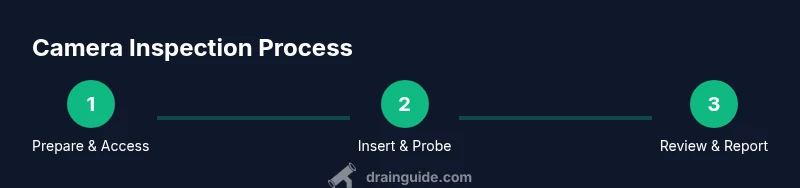
Set up a clean, dry workspace near the access point. Gather the drain inspection camera, monitor, power source, safety gear, and recording materials. Verify the camera’s LED lights work and that the display connects reliably. This foundation prevents mid-inspection tool failures and keeps you safe.
Tip: Test the camera in a dry area before approaching the drain to confirm focus, lighting, and feed speed. - 2
Inspect access point and prepare drain
Clear the area around the cleanout or access point. Remove debris and ensure the pipe opening is accessible without forcing equipment. If the access is tight, use a small mirror or light wand to locate the entry and confirm the camera will fit.
Tip: Never force the camera through a tight bend; reassess access size or choose a smaller-diameter camera. - 3
Attach and power the camera
Connect the camera to the monitor or wireless receiver and power up. Confirm the live feed appears clearly on the display, with good lighting. Adjust LED brightness if the image appears too dark or washed out.
Tip: Use a fresh battery and avoid over-discharging; a stable power source reduces video dropouts. - 4
Insert camera and begin probing
Gently insert the camera into the drain, keeping the tip level and feeding slowly. Watch the feed for movement, bends, and features; avoid rapid jerks that can kink the cable. If you encounter resistance, back up and rotate slightly to find a smoother path.
Tip: Move in small increments and pause to review footage before advancing further. - 5
Take notes and capture footage
Record key findings with timestamps and labeled stills. Photograph any blockages, roots, or damage you see. Note the exact pipe segment and any landmarks to help align footage with actual locations in your home.
Tip: Label files with date, location, and a brief finding to simplify later reference. - 6
Retrieve the camera and perform post-checks
Slowly retract the camera, ensuring the cable remains straight and untangled. Inspect the camera tip for any debris or damage after withdrawal, then wipe it clean. Power down and unplug all equipment before storing.
Tip: Check for cable wear or kinks during withdrawal; address issues before next use. - 7
Review footage and plan next steps
Review the recorded feed with your observations and compare them to any prior symptoms or service history. Decide whether DIY remediation is feasible or if a licensed plumber should be consulted for root treatment or pipe replacement.
Tip: Attach footage and notes to repair requests to improve communication with professionals. - 8
Store equipment and schedule maintenance
Clean all components, dry them thoroughly, and store in a sealed case. Schedule periodic maintenance, including battery checks and cable inspections, to extend tool life and ensure readiness for the next inspection.
Tip: Keep spare batteries charged and ready for the next use.
Got Questions?
What is a drain inspection camera?
A drain inspection camera is a borescope-style device with a lighted camera at the tip used to visually inspect the interior of drains and pipes. It helps you identify blockages, root intrusion, and pipe damage without invasive digging.
A drainage camera is a small, lighted tool you poke into pipes to see what's inside, helping you spot blockages and damage without tearing things apart.
Do I need professional training to use one?
Basic operation is achievable for homeowners with careful reading of the manual and following safety steps. More complex diagnostics or root treatment should be handled by a licensed plumber.
Basic camera use is doable for DIYers, but complex pipe work should be left to professionals.
How long can the camera cable reach?
Cable reach varies by model and pipe layout. Plan for the longest run you need and verify the camera’s compatibility with access points in your home.
Length depends on the model; plan for the farthest run you expect to inspect.
Is it safe to use near electrical lines?
Exercise caution around electrical components and shut off power to nearby outlets if there’s a risk of water contact. Use non-conductive tools where possible and follow local codes.
Be careful around electricity and water; shut power if needed and proceed safely.
What should I do after inspection?
Review the footage, label findings, and decide on next steps—DIY clearance, root treatment, or professional pipe repair/replacement. Use the footage to communicate clearly with contractors.
After inspection, review findings and decide whether to DIY or hire a pro.
How should I maintain the camera after use?
Rinse and dry the camera tip, wipe the cable, and store in a protective case. Inspect for wear before the next use and replace damaged parts promptly.
Clean and dry the camera tip, store safely, and check for wear before reuse.
Watch Video
The Essentials
- Identify blockages and root intrusions with clear footage.
- Choose camera features that fit your pipe size and access points.
- Document findings thoroughly to support next steps.
- Follow safety guidelines for safe, effective inspections.