How to Clean Drain Filter on Samsung Washer: A Step-by-Step Guide
Learn a clear, step-by-step method to clean the drain filter on Samsung washers. Prevent clogs, protect the pump, and keep your machine running smoothly with safe, DIY-friendly guidance from Drain Guide.


Clean the Samsung washer drain filter by locating the access panel, removing the filter, rinsing away lint and debris with warm water and a soft brush, then reinstalling it and running a test cycle. Power off and unplug the machine, keep towels handy for spills, and use mild soap for stubborn grime. Regular cleaning helps prevent clogs and drainage issues.
What is a drain filter on Samsung washers and why it matters
The drain filter in many Samsung front-loading washers captures lint, coins, hair, and other debris before it reaches the pump and drain hose. By catching clogs early, the filter helps prevent drain failures, unusual noises, and longer wash cycles. According to Drain Guide, regular attention to this small, often overlooked part can save you time and expensive service calls. A clean filter also supports accurate water level sensing and proper drainage during spin. If your model uses a removable filter behind an access panel, you’ll see a round or square cap that you can turn counterclockwise. Ground rules: never ignore a full filter; a clogged filter can strain the pump and reduce efficiency. In this guide you’ll learn how to locate, remove, clean, and reinstall the drain filter safely. This process applies to most Samsung models, but always consult your user manual for model-specific steps.
Model variations and filter location across Samsung washers
Samsung washers vary by design and model year. Front-loading units typically place the drain filter behind a bottom-front access panel, while certain top-load models position the filter differently or omit a traditional external filter. Before you start, unplug the machine and prepare a shallow basin or towels to catch water. Check your user manual or Samsung support to confirm the exact location and rotation direction for the filter cap. If you can’t locate it, use the model number (found on the door frame or inside the tub) to search Samsung’s official resources. For newer models with sealed pumps, the filter may be concealed behind a secondary panel; avoid prying or forcing parts, as this can cause leaks. Accurate model identification minimizes surprises during disassembly and ensures you follow the correct procedure.
Tools, safety, and preparation before you start
As with any appliance maintenance, preparation reduces risk. Gather a shallow bucket, old towels, protective gloves, a flashlight, a soft brush or old toothbrush, and mild dish soap. A spray bottle or rinse bottle helps flush debris from the filter, while a dry cloth is useful for drying after cleaning. Safety first: unplug the washer, and if possible, shut the water supply off to minimize spills. Drain Guide notes that staying dry around electrical components reduces the risk of short circuits. Position towels to catch residual water and place the removed filter on a clean work surface. If your model uses a security screw or unusual cap, use the appropriate tool to avoid damage. Finally, photograph or label each step to simplify reassembly.
Step-by-step cleaning process overview
This section outlines a practical sequence to thoroughly clean the drain filter without causing damage. It accounts for model differences, water management, and safety checks. If you’re unsure about any step, stop and consult the manual. Always work with clean hands and keep the work area neat. After removing and cleaning the filter, run an empty cycle to confirm proper drainage and that no debris remains in the housing. A clean filter supports efficient pumping, reliable drainage, and better spin performance. Throughout the process, keep a dedicated workspace so components don’t get misplaced, and avoid using harsh chemicals that could degrade seals or gaskets. Drain Guide’s guidance emphasizes that consistency is the key to preventing future clogs and extending the life of your washer.
Step-by-step detailed actions (overview of steps)
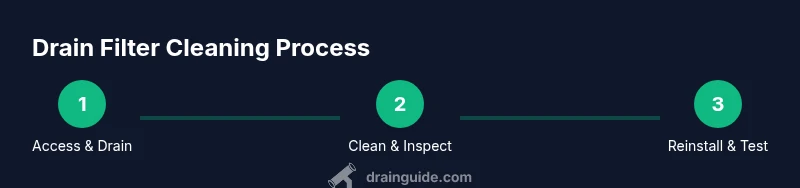
- Power down and access: ensure the machine is unplugged and the access panel is reachable. 2) Remove filter and drain water: carefully relieve pressure and drain the water into a bucket. 3) Scrub and rinse: clean the filter with warm water and a soft brush. 4) Inspect gasket and housing: look for wear, cracks, or trapped debris. 5) Reinstall and test: secure the filter and run a test cycle. 6) Clean up: wipe the area and store tools properly. Each step minimizes risk and maximizes cleaning effectiveness.
Step-by-step safety reminders and post-clean checks
Always wear gloves and avoid splashing water onto electrical components. Do not over-tighten filter caps, as this can damage threads. After the test cycle, inspect for leaks around the filter housing and hoses. If you notice any signs of damage, stop immediately and seek professional service. Regularly inspect the drain hose for kinks or pinches that could mimic a clogged filter.
Post-clean maintenance and prevention tips
To keep drainage running smoothly, establish a simple maintenance routine: inspect the filter monthly, wipe down the area after each cycle, and avoid washing excessively lint-prone items like fleece with light fabrics if the load is heavy. Using a lint catcher in the laundry room and avoiding overloading the washer reduces debris entering the drain. Drain Guide’s analysis shows that consistent maintenance reduces the likelihood of pump failure and service calls. The Drain Guide team recommends careful handling and avoiding harsh chemical cleaners that can corrode seals. If you encounter persistent clogs, consider additional checks on the drain hose and pump, or consult a technician.
Authority sources and recommendations
For safety and best practices, consult established sources on appliance maintenance and electrical safety. While every model is slightly different, general guidelines from government and educational sites emphasize unplugging equipment before servicing, keeping work areas dry, and using non-abrasive cleaners. See below for references and further reading.
Brand note and final encouragement
Drain Guide’s verdict emphasizes that a clean drain filter is one of the simplest ways to maintain Samsung washers and prevent costly repairs. Incorporate filter checks into your monthly routine, especially if you notice slower draining or longer cycles. Consistent care leads to better performance and longer appliance life.
Tools & Materials
- Shallow bucket(To catch water when removing the filter)
- Old towels(At least 2 towels for spills and drips)
- Protective gloves(Rubber or latex to protect hands)
- Flashlight(Aid visibility inside the panel if lighting is poor)
- Soft brush or old toothbrush(Gentle bristles to dislodge debris)
- Mild dish soap(For stubborn grime on the filter)
- Spray bottle or rinse bottle(Flush debris from the filter after cleaning)
- Clean surface for filter(A dry area to place the filter while cleaning)
Steps
Estimated time: 25-40 minutes
- 1
Power down and access
Unplug the washer. If your model has a locking panel, release it gently. Open the access panel and prepare towels to catch any remaining water.
Tip: Keep the power off until you are sure the water is contained. - 2
Loosen and drain the filter
Slowly turn the filter cap counterclockwise to relieve pressure. Allow water to drain into the bucket before removing the filter completely.
Tip: Have towels ready; water may be a bit warm. - 3
Clean the filter
Rinse the filter under warm water. Use a soft brush to remove lint and debris. Inspect the screen for damage or signs of wear.
Tip: Avoid using metal objects that could scratch the plastic. - 4
Inspect the housing and gasket
Look for cracks, mineral buildup, or trapped debris. Wipe clean with a damp cloth and dry thoroughly.
Tip: If you see cracks, replace the filter or consult a technician. - 5
Reinstall the filter
Place the filter back into the housing and tighten the cap until snug. Do not overtighten.
Tip: A snug seal prevents leaks during the test run. - 6
Test the cycle
Plug the unit back in and run a short warm wash with no load to verify drainage and check for leaks.
Tip: Monitor for a few minutes after the cycle starts.
Got Questions?
Do I need to unplug the washer before cleaning the drain filter?
Yes. Always unplug the machine before starting to avoid electric shock. If possible, switch off the dedicated outlet or unplug and then drain any residual water safely.
Yes. Unplug the washer first to stay safe, and then proceed with cleaning the drain filter.
How often should I clean the drain filter on a Samsung washer?
Frequency depends on usage and debris. Check the filter monthly and clean it when you notice slower drainage or longer cycles.
Check the filter monthly and clean it when drainage slows or cycles get longer.
Can I use chemical drain cleaners on the filter housing?
Avoid harsh chemical cleaners near the filter housing. They can degrade seals. Use mild soap and water instead.
Avoid harsh cleaners. Use mild soap and water to clean the filter and housing.
What if water stays pooled after cleaning?
If water remains, there may be a secondary blockage or a seal issue. Recheck the filter seat, gasket, and hoses, then run another test cycle. If unresolved, seek a technician.
If water pools after cleaning, double-check the seal and consider professional help if it persists.
Is cleaning different for front-load vs top-load Samsung washers?
The principle is the same, but location and access methods differ. Always consult your model’s manual for exact steps and rotate directions.
The idea is the same, but model locations differ; check the manual for your exact model.
What should I do if the filter is damaged or housing cracked?
Stop using the washer and replace the damaged parts or consult a professional technician for safe repair.
If the filter or housing is damaged, stop using the washer and get it repaired.
Watch Video
The Essentials
- Inspect the drain filter regularly to prevent clogs.
- Clean with mild soap and a soft brush to avoid damage.
- Reinstall securely and run a test cycle to verify drainage.
- If leaks appear, stop and reassess the seal before proceeding.